The weather in Princeton was lovely yesterday, wouldn't you agree?
At the Hadrian Hotel

Thursday, April 06, 2006


Wednesday, March 15, 2006
ETech: Final Notes to Myself
The theme for this year's ETech was "The Attention Economy." The amount of information available to people on the Internet today can be completely overwhelming. We need to divide our attention economically so that everything we need to (or want to) know about can be processed. A number of projects, products, and tools were presented to assist someone who is trying to deal with today's info-glut. There were also a number of talks discussing how we tend to focus or divide our attention, and what we might do better. Below are some notes to myself about what I saw, so that when I inevitably do forget, I'll have a place to look up this stuff.
Monday:
I attended a tutorial called "Scaling Fast and Cheap - How We Built Flickr" given by Cal Henderson. Flickr started out as part of an online game to be called "Game Neverending" (GNE), being developed by Ludicorp in Vancouver. It was originally implemented in Flash, which prevented it from scaling very far. I tried out the Flash version at ETech 04 and found it to be interesting but a bit slow. The current implementation seems fast enough to me and obviously scales, as there are over 2 million users and over 100 million pictures in Flickr today.
Cal covered quite a bit of ground over the course of the day.... Flickr was originally implemented using commodity (white box) hardware. They originally tried customizing the kernel and various other bits of software but found that the extra work involved was not justified by the small performance gains achieved. Cal had a great quote from Donald Knuth: "We should forget about small efficiencies, about 97% of the time." Here's a very small sample of the stuff we learned in the tutorial, some of which seemed like common sense but much of which could only be learned through experience:
Make sure you have enough rack space. Make sure you have enough power and networking in each rack. When you buy spares, ensure that you get identical spares for things such as disks, and not just equivalent sizes. This can be crucial when you need to replace a disk in a RAID set. If you must use a data center on the 24th floor, make sure that any equipment you buy (such as additional UPS systems to increase capacity) can actually fit in the elevator. Otherwise it might take a while to disassemble, move, and reassemble the equipment. Have as much redundancy as you can afford (hot spares, cold spares, spare disks, spare network gear, etc). 100M ethernet is probably fast enough for most applications. Software architecture is like a trifle (an English trifle, not a Canadian trifle). The 3 rules of enterprise system development: use source control; have a one step build; use a bug tracker. Filtering (X)HTML input in order to prevent cross-site-scripting attacks can be a royal pain. There are so many ways an attacker can format (eg random white-space or newlines between "java" and "script" in the word "javascript") or encode things (eg "j", j, j, j, %6A) that you need to be extremely clever if you're filtering with regular expressions.
If you want to know more, you'll need to buy Cal's book which is due out from O'Reilly, probably in the first half of 2006. I'm not sore what the title will be, but it will be authored by Cal Henderson and will be something about web applications.
Monday Evening:
For me, the highlight of the Monday evening keynotes was Bruce Sterling's "The Internet of Things." He packed alot of words and imagery into a fairly short talk. You can get a taste of what we heard in an available podcast. Unfortunately, a talk of this type would have been better earlier in the day. 8:30 PM was a bit late to get started.
Tuesday:
In the morning we were treated to a number of keynote talks. The 3 I found most interesting were Ray Ozzie's "Simple Bridge-building," Dick Hardt's "Who Is the Dick on My Site," and Linda Stone's "Attention: The 'Real' Aphrodisiac." Ozzie spoke about Microsoft's web "clipboard" technology, which looked very interesting. Hardt did one of his "Identity 2.0" talks, which are always entertaining. He shares a rapid-fire slide presentation style with Larry Lessig. Stone's talk was all the more interesting because a large percentage of the audience appeared to be paying more attention to their laptop screens than to the speaker. More information about all of these talks can be found by looking for ETech at Technorati.
Foldera Unveiled...
playsh...
Building More Useful Mashups...
Sigh....
This entry was started on March 15, 2006. It is now May 22, and I have unfortunately forgotten the rest of what I was going to write. I guess that if I'm going to be serious about blogging, I'll need to start setting aside time each week to do it.
Technorati Tags: ETech, ETech 06
Monday:
I attended a tutorial called "Scaling Fast and Cheap - How We Built Flickr" given by Cal Henderson. Flickr started out as part of an online game to be called "Game Neverending" (GNE), being developed by Ludicorp in Vancouver. It was originally implemented in Flash, which prevented it from scaling very far. I tried out the Flash version at ETech 04 and found it to be interesting but a bit slow. The current implementation seems fast enough to me and obviously scales, as there are over 2 million users and over 100 million pictures in Flickr today.
Cal covered quite a bit of ground over the course of the day.... Flickr was originally implemented using commodity (white box) hardware. They originally tried customizing the kernel and various other bits of software but found that the extra work involved was not justified by the small performance gains achieved. Cal had a great quote from Donald Knuth: "We should forget about small efficiencies, about 97% of the time." Here's a very small sample of the stuff we learned in the tutorial, some of which seemed like common sense but much of which could only be learned through experience:
Make sure you have enough rack space. Make sure you have enough power and networking in each rack. When you buy spares, ensure that you get identical spares for things such as disks, and not just equivalent sizes. This can be crucial when you need to replace a disk in a RAID set. If you must use a data center on the 24th floor, make sure that any equipment you buy (such as additional UPS systems to increase capacity) can actually fit in the elevator. Otherwise it might take a while to disassemble, move, and reassemble the equipment. Have as much redundancy as you can afford (hot spares, cold spares, spare disks, spare network gear, etc). 100M ethernet is probably fast enough for most applications. Software architecture is like a trifle (an English trifle, not a Canadian trifle). The 3 rules of enterprise system development: use source control; have a one step build; use a bug tracker. Filtering (X)HTML input in order to prevent cross-site-scripting attacks can be a royal pain. There are so many ways an attacker can format (eg random white-space or newlines between "java" and "script" in the word "javascript") or encode things (eg "j", j, j, j, %6A) that you need to be extremely clever if you're filtering with regular expressions.
If you want to know more, you'll need to buy Cal's book which is due out from O'Reilly, probably in the first half of 2006. I'm not sore what the title will be, but it will be authored by Cal Henderson and will be something about web applications.
Monday Evening:
For me, the highlight of the Monday evening keynotes was Bruce Sterling's "The Internet of Things." He packed alot of words and imagery into a fairly short talk. You can get a taste of what we heard in an available podcast. Unfortunately, a talk of this type would have been better earlier in the day. 8:30 PM was a bit late to get started.
Tuesday:
In the morning we were treated to a number of keynote talks. The 3 I found most interesting were Ray Ozzie's "Simple Bridge-building," Dick Hardt's "Who Is the Dick on My Site," and Linda Stone's "Attention: The 'Real' Aphrodisiac." Ozzie spoke about Microsoft's web "clipboard" technology, which looked very interesting. Hardt did one of his "Identity 2.0" talks, which are always entertaining. He shares a rapid-fire slide presentation style with Larry Lessig. Stone's talk was all the more interesting because a large percentage of the audience appeared to be paying more attention to their laptop screens than to the speaker. More information about all of these talks can be found by looking for ETech at Technorati.
Foldera Unveiled...
playsh...
Building More Useful Mashups...
Sigh....
This entry was started on March 15, 2006. It is now May 22, and I have unfortunately forgotten the rest of what I was going to write. I guess that if I'm going to be serious about blogging, I'll need to start setting aside time each week to do it.
Technorati Tags: ETech, ETech 06
Thursday, March 09, 2006
ETech: Roomba Cockfighting
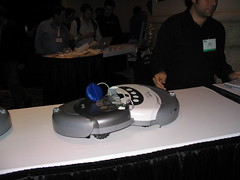
Those of you who read Make Magazine know that Phil Torrone has been working on remote-controlled Roomba vacuum cleaners. Well, tonight at ETech, Phil and Jeff Han got to test their mettle battling their Roombas in a Roomba cockfight. I took a few pictures and put them up on flickr. I also took 2 video clips of a short battle and a slightly longer battle. After a few more rounds of fighting, I suggested to Phil that we could mount my digital camera to the top of one of the Roombas to create the RoombaCam. The result is 5 video clips in RoombaVision™. They are round n-4, round n-3, round n-2, round n-1, and the final round.
Technorati Tags: ETech, ETech 06, Roomba, Roomba Cockfighting
Wednesday, March 08, 2006
ETech: Trusted Computing
The idea of Trusted Computing is alive and well here at ETech. However, it's probably not the Trusted Computing you're thinking of. The ETech version is shown in this picture....
Technorati Tags: ETech, ETech 06, Trusted Computing

Technorati Tags: ETech, ETech 06, Trusted Computing
Tuesday, March 07, 2006
Multi-touch User Interface

I just saw the most incredible demo here at ETech 06. Jeff Han from NYU showed their multi-touch user interface, "and the crowd went wild." The interface consists of an angled acrylic panel with a projector beneath it. There are LEDs shining light into the sides of the panel and when you touch the panel, your finger (or whatever you touch it with) scatters the internally reflected light which is then picked up by sensors beneath the panel. Their technique allows you to touch the panel at many points simultaneously, enabling a very complex yet intuitive user interface.

As you might imagine, it is possible for multiple people to use the interface at the same time, allowing new methods of collaboration and interaction. One of the demo applications was a game where the object is to move around nodes on a graph in order to eliminate crossed connection lines. Jeff had 2 game boards on the screen at the same time, allowing 2 people to play against each other (modulo enough processor power underneath to do all the math and re-drawing work).
Another demo app. was a type of photo album that allowed you to move images around, resize them by pinching or spreading your fingers, and rotate them by moving putting down 2 fingers and making a circular motion. Jeff them demonstrated the same type of application displaying live video streams (somewhere over 100 streams!). That one looked like a great way to watch everything on TV at once. :-)
Jeff also showed a drawing/animation application that allowed you to draw closed-loop shapes and then animate them by simply wiggling 1 or 2 fingers within the boundary of the shape.
The really cool application was a type of "Google Earth on steroids." Imagine everything you can do with Google Earth,
 but doing it by touching a screen with particular gestures. As Jeff "drilled down" on the image of the globe, the satellite imagery seamlessly gave way to detailed street maps with buttons allowing you to bring up additional information about the area you were looking at. Words really fail me at this point. If I've whetted your appetite, go to Jeff's page and look at the demo reel (MPEG or QuickTime).
Technorati Tags: GUI, multi-touch, User Interface, ETech, ETech06
Monday, March 06, 2006
Views From the Air
On my flight from New Jersey to California, I decided to try out my GPS. To my surprise, it was able to see between 3 and 6 satellites even if I left it on the tray-table. So, I decided to take some pictures and (later) tag them with GPSPhotoLinker. This photo is the first of a set on flickr showing the result.
Technorati Tags: Flickr

Technorati Tags: Flickr
Thursday, March 02, 2006
GPSPhotoLinker
While surfing around the net a while back, I came across a neat little application named GPSPhotoLinker. It is a Mac application that will take information from a GPS track file and merge the location information into the EXIF headers of selected JPEG files. Of course, in order to merge track information into a photo, you need to generate a track file. This is easily done with modern handheld GPS units such as the Garmin eTrex Legend. In mid-February I acquired just such a device. With my eTrex in hand and my Canon Powershot A70 camera, I was ready to start using hardware to add location information to my pictures, rather than doing it manually after finding the locations with Google Earth.

For a first test, I took a few pictures just outside of my office like the one at the left. First, I made sure that the eTrex had found enough satellites to display my location and that the time zone was configured correctly. Second, I made sure that the clock on my camera was right. Then I walked around a bit and took some pictures.
For a first test, I took a few pictures just outside of my office like the one at the left. First, I made sure that the eTrex had found enough satellites to display my location and that the time zone was configured correctly. Second, I made sure that the clock on my camera was right. Then I walked around a bit and took some pictures.
The eTrex logs its current location at regular intervals and timestamps each entry. My camera logs the time that each picture is taken in the EXIF header of the JPEG file. It is these two timestamps that GPSPhotoLinker uses to put the right location information into each picture.
Once I had taken the pictures, it was time to download everything to my PowerBook and see what the program could do. Now, I don't use iPhoto when downloading pictures as I have a number of command line tools (based on Phil Harvey's excellent exiftool) that I use to set different EXIF and IPTC fields such as copyright and keywords. Instead of using iPhoto, I simply copy the JPEG files into a folder on my Desktop, open the folder, and fire up Terminal. I 'cd' to the folder and use some of my tools to add copyright, keywords, and whatever else I might want. I also run a script that adds a "GPS template" to every image I want to GPS tag. I'll explain why a bit later.
With the images prepared, I connect the eTrex to a USB-to-serial adapter, launch GPSPhotoLinker, and use its "Download Tracks" function to download the track log to my Documents folder. The next step is to load the photos into GPSPhotoLinker. Once the photos are loaded, it is now possible to add the GPS location information to each image file. The program allows you to "link" photos individually or in a batch. The "standard" mode displays 3 possible options for location values to use on your picture. Based on the timestamp in the image you will see the track point immediately preceding the photo time, the the track point immediately following, and a time-weighted average location. All three options have a "View on map" button and a "Save to photo" button. These buttons do just what you think they do. Choose the track point that most closely represents the location at which the photo was taken and click on the "Save to photo" button.
If you're trying to save coordinates to multiple photos, you can use GPSPhotoLinker's batch mode. Here you have a number of options. You can have the program select the nearest recorded point or a time-weighted average of points that are within a specified number of seconds, a specified number of meters, or a combination of the two. All-in-all, this is a very flexible program.
I said earlier that I needed to add a GPS template to the photos before I could run GPSPhotoLinker against them. Without a template, every time I added GPS information to a photo, the "maker notes" section of the EXIF header would be corrupted (I found this when I later tried to change another EXIF header value with exiftool). The corruption was verified using exiv2, on which GPSPhotoLinker is based. However, between the time I started writing this post (Thursday night) and now (Friday night) a new version of GPSPhotoLinker (1.3.5), based on a newer version of exiv2, was made available to me. This version does not corrupt the maker notes in the EXIF header, so I no longer need to pre-process the files before running GPSPhotoLinker.
On Sunday I leave for the O'Reilly ETech conference in San Diego, where I plan on taking a bunch of pictures and geocode them using GPSPhotoLinker. To see the result, take a look at my flickr photos tagged with etech06.
Technorati Tags: GPS, EXIF, Flickr, ETech, Tutorial
Friday, February 17, 2006

Seasonal Vegetables
According to the US Government, ketchup is a vegetable. Here's some of the winter crop.
Technorati Tags: Flickr

Technorati Tags: Flickr
Friday, February 03, 2006
Google Maps and Google Earth Street Maps for Torino Italy
Google Maps (aka Google Local) now has street-level maps of Torino, Italy. Google Earth's roads layer also shows the streets. So, who will be the first one out of the gate with mashups showing all of the Olympic venues?
This has also been blogged over at Google Maps Mania.
UPDATE: This post in the Official Google Blog tells of more enhancements for our Googley Olympics Experience, including a KMZ file showing the Olympic venues in Google Earth.
Technorati Tags: Google Maps, Google Earth, Olympics, Torino, Italy
Thursday, February 02, 2006
MAKE: Blog: DIY Headcam...
I don't read a whole slew of blogs (who has the time?), but of the dozen or so I do read, I think I enjoy the Make blog the most. There are people all over the world fabricating really cool things all the time, and this blog touches on a number of them. For example, some folks needed a way to shoot video while hiking and decided to build their own headcam. This looks like a fun toy to me, even though I have no serious use for such a device.
Technorati Tags: Make Magazine, DIY, video camera
Technorati Tags: Make Magazine, DIY, video camera
Wednesday, January 18, 2006
Google Talk is Now Reachable
As detailed in this post on the official Google Blog, Google Talk is now reachable from any jabber server around the world. As you might have guessed from my previous blog entry, I've been tracking this pretty much since Google Talk went online. Yesterday morning (on the east coast), I found that the service was almost open and updated my entry. Unfortunately for me, I wasn't online when they decided on the west coast to make the final change that got everything working. The announcement from the engineer who actually got to enable this can be found here. So much for getting the scoop....
I haven't yet read any of the other posts linked to the official announcement, but I did do some testing this morning and found that both presence messages and IMs appear to be going through nicely. I guess that now I can stop logging into both Google Talk and my local jabber server and cross-polinate my contact lists. That way, it won't matter which service I use, I'll still be able to get to everybody. Just the way it should work....
Technorati Tags: Google Talk, Jabber, XMPP, Federation
I haven't yet read any of the other posts linked to the official announcement, but I did do some testing this morning and found that both presence messages and IMs appear to be going through nicely. I guess that now I can stop logging into both Google Talk and my local jabber server and cross-polinate my contact lists. That way, it won't matter which service I use, I'll still be able to get to everybody. Just the way it should work....
Technorati Tags: Google Talk, Jabber, XMPP, Federation
Monday, January 16, 2006
Gtalk Online Status Display
Jon Burrows has written a Gtalk Online Status Display 'bot that you can use to show your current presence status on a web page. Just add gtalkonlinestatus@gmail.com to your contacts and then add an IMG tag to your web page with a SRC of
Technorati Tags: Google Talk, Jabber, XMPP
http://www.jonburrows.co.uk/gtalkstatus.aspx?User=???where "???" is replaced by your Google Talk ID.
Technorati Tags: Google Talk, Jabber, XMPP
Sunday, January 15, 2006
The Jeff Pulver Blog: Sunrise over Waikiki Beach, Hawaii
Jeff Pulver blogged some very nice pictures of
sunrise over Waikiki Beach, Hawaii as well as some from Oahu.
sunrise over Waikiki Beach, Hawaii as well as some from Oahu.
Friday, January 13, 2006
Google Talk is Almost Reachable
As of a few months ago, there were no DNS SRV records for XMPP server-to-server connections to the gmail.com domain. Then there was one pointing to TCP port 5269 on talk.google.com. Unfortunately, that port was unreachable. Then, a few weeks ago (I think) SRV records were added for 2 more servers, but all three were still unreachable. Yesterday I checked again, and all three servers were still unreachable. Today, I decided to write a little perl script to more easily check the status of server-to-server reachability for JID domains. Naturally, the first one I wanted to check was gmail.com. I almost fell out of my chair when I saw that all three servers were reachable on port 5269! It turns out that you get an immediate disconnect when you do try to connect, but there is definitely something listening today that wasn't there yesterday.
What this means is that Google Talk users are one step closer to being reachable by people using other jabber servers out on the greater Internet. Goole Talkers will no longer be trapped in their current walled garden. Instant Messaging for the masses is getting closer and closer to the EMail model, where it doesn't matter who your provider is - you can still communicate with everybody else.
You can bet that I'll be checking this at least daily to see when they go live with server-to-server connectivity. I'll also be watching the IM Federation's networks page to see when Google Talk gets out of the "Pending" column.
This is going to be fun!
UPDATE: As of around 10:30 AM EST (UTC -05:00) on 17 Jan, all 3 of the servers advertised in gmail.com's SRV records are (apparently) running web servers that send out "302" messages re-directing you to http://www.google.com/talk/ when you connect to port 5269. However, it's actually not just a web server running there. Whatever is running there does seem to understand XML streams. It just doesn't currently support urn:ietf:params:xml:ns:xmpp-streams stanzas, so messages and presence information don't currently make it from my jabber server into theirs. However, the initial server-to-server connection does appear to come up. It looks like we're one step closer!
UPDATE: As everybody knows by now from this post and this post (and this post ;-) ), Google Talk users can now "jabber" with the rest of the world. Note that this update is mostly a shameless act of self-promotion, wherein I'm attempting to show that I was there, trying to make it work, just before it went live.
Technorati Tags: Google Talk, Jabber, XMPP
Thursday, January 12, 2006
Google Local and Talk for the Blackberry
On the Google Blog today the announced: Google Talkabout: YT?...Google Talk for BlackBerry which, unfortunately, won't really be available until the spring, according to the press release on the RIM site. What I did find out about there, but hadn't heard about before, was the availability of Google Local for the Blackberry. Just browse over to www.google.com/glm from your Blackberry and download it.
I had a little time to play around with this, and I'm impressed. Even with the relatively low rate data connection I get from Cingular, the maps loaded, panned, and zoomed at a pretty reasonable speed. However, while it's a cool that you can switch to the satellite view, don't bother unless you feel like waiting (and waiting, and waiting...).
The program starts up with the pointer in the middle of a US map. Click on the wheel to bring up a menu. From here, you can search for a location, get directions, move the map to one of your recently visited places, clear the map, or learn how to pan and zoom. As for the latter 2 items, the clickwheel can be used to pan up and down, and if you hold down the "moon" key, the wheel will pan left and right as well. For the clickwheel-impaired, "u" and "j" move you up and down, and "h" and "k" go left and right. Oh, and you use "i" to zoom in and (you guessed it) "o" to zoom out.
Search strings are the same as for the Google Local web site (as you would expect), but you use numeric keys to bring the various hits to the front. Fortunately, you don't need to use the moon key to get the numbers - the app is smart enough to know that "w" is 1, "e" is 2, etc. I'll need to play around with this a bit more to see if there are any shortcut keys available (or I could always read the help screen).
All-in-all, this looks like a nice little application, especially when you need that pizza fix when you're on the road.
Technorati Tags: Google Talk, Blackberry, Google Local
Wednesday, January 11, 2006
Google Earth for the Mac!
According to this article on the Official Google Blog, Google Earth is now available for the Mac. Also, the PC version has finally come out of beta. I just downloaded the official Mac version and will probably be wasting quite a bit of time with it this evening.
Technorati Tags: Google, Google Earth, Mapping
Wednesday, January 04, 2006
Migrating Yourself (and your friends) Away From AIM/MSN/Yahoo!/etc
Are you tired of "AIM Today" popping onto your screen every time you get onto the computer, in spite of your preference settings? Or, how about random movie ads playing through your speakers with a little postage-stamp size image in your IM client window? Would you like to be able to treat IM addresses more like EMail addresses? Would you like to play with cool 'net toys that use your presence information to put images on maps (see my earlier post)? Me too!
So, here's the deal: There are other applications available on the Internet that will speak multiple proprietary IM protocols, such as those used by AIM and MSN, as well as a newer, non-proprietary protocol known as XMPP. This is the protocol known popularly as Jabber (which was its name before it was formalized in RFCs and recognized by the IETF).
For MS-Windows and Linux I use a program known as gaim. For the Mac, I prefer adium. Both programs support AIM, ICQ, MSN Messenger, Yahoo! Messenger, Jabber, and a few others. So, if you have accounts on any of those proprietary systems, you can now run just one program and chat with all of your "buddies." You can also add new friends on Google Talk as well as any public Jabber server anywhere in the world.
If you're a Linux or MS-Windows user, go get the latest version of gaim, install it, and fire it up. You'll be greeted by a 'Login' window and the 'Accounts' window. Bring the Accounts window to the front and click on the 'Add' button. Pick a protocol and type in your screen name and password. Check the 'Remember password' and 'Auto-login' boxes and click on 'Save' button Then, in the Accounts window, check the 'Online' box. Once your buddy list comes up, you can close the Accounts window. Next time you start gaim, you'll be logged in automatically.
Now, if you have a GMail account, you can use gaim for that as well. Click on the 'Tools' menu bar entry and then click on the 'Accounts' entry. In the Accounts window, click on the 'Add' button and select Jabber as the protocol. Enter your GMail username as the Screen Name and "gmail.com" as the server. Enter your GMail password in the appropriate place and check the 'Remember password' and 'Auto-login' boxes. Now, click on the '+' next to 'Show More Options.' Enter "talk.google.com" in the 'Connect server' box and click on 'Save.' Back in the Accounts window, check the 'Online' box for the new account and then close the Accounts window.
A neat feature of gaim is the ability to group buddies. So, if you have a friend who has multiple IM accounts, you can group all of them under one entry in your buddy list. Find the entry you want to be the top of the group and right-click on it. Select "expand" from the menu and then drag the other buddy entries for this person under the expanded entry. You can arrange the grouped buddy entries in any order you want. Click on the minus sign to collapse the list. Normally, hovering over a "grouped" buddy will expand the list temporarily, so you can select which entry to IM. Or, you can just double click on the group entry which will send a message to (I believe) the top online address in the group.
Adium is a somewhat different beast. First off, it is a native Mac OSX application, and is nicely integrated with the Mac Address Book application. Second, it understands Apple's Bonjour protocols, so you can easily find other Mac users on your local network who might be interested in chatting, whether they are running adium or iChat.
The first time you start Adium, you will be greeted by the 'Preferences' window, ready for you to set up an account. Click on the '+' sign and then on the protocol you wish to configure. What you do next depends on the protocol you've chosen. If you've chosen "AOL Instant Messenger" then all you need to do is enter your Screen Name, your Password, and then check the 'Automatically connect on launch' box before you click on the 'OK' button.
Let's say that you're going to add your Google Talk account, so you selected the Jabber protocol. Enter your GMail address as the 'Jabber ID' and your GMail password as the Password. Click on 'Options' in the top of the window and enter "talk.google.com" as the 'Connect Server.' Then check the 'Use TLS...' and 'Automatically connect...' check boxes and click on the 'OK' button.
Provided that you got the Screen Name (/Jabber ID) and the Password correct, you will now be connected to the IM server for the protocol you've just configured. Since the 'Preferences : Accounts' window is still open, you can add any other accounts you might have. Note that for Bonjour, you can put pretty much whatever you want in for the 'User Name' and the program won't care. You're probably best off putting your name, if you want your friends to be able to find you.
That ought to be enough to get you started. Now you can get your friends to switch over too, and you'll all be well on your way to leaving the proprietary IM systems behind. If you don't have a GMail/Google Talk account, get one! Pretty soon, Google should be allowing connections from other Jabber servers on the Internet, opening up literally a whole world of people for you to chat with.
Technorati Tags: Jabber, xmpp, gaim, adium, tutorial
Friday, December 23, 2005
Google Holiday Logos
The folks at Google are at it again with this year's Google Holiday Logos. Over the past few years they've occasionally replaced their search page logo with a series of logos that tell a story or celebrate an event. Here are the ones they've done so far:
Keep checking back at this year's doodle page to see how the cat and mouse do....
Technorati Tags: Google
Sunday, December 18, 2005
This Year's Gingerbread House


The boys spent a few hours on this last weekend, and their effort shows. Eric did the side of the roof visible in the front view and Mark did the side of the roof visible in the rear image (the one with the covered porch).
Technorati Tags: flickr
Subscribe to:
Posts (Atom)